RunBase How to add Records to Include control
This article also applies to Jobs implemented based on the RunBaseBatch framework.
Default assumption: the RunBase Job has caching enabled (pack / unpack).
Business Background
In D365 Finance & Operations, users often want to specify filter criteria through the Records to include control before running a Job, so that only the relevant set of records is processed.
However, in custom RunBase / RunBaseBatch Jobs:
- The system does not automatically provide this control by enabling a specific property
- Official documentation provides very limited explanation
- Many developers are unclear about the underlying implementation mechanism
This article demonstrates the simplest implementation approach to correctly add the Records to include control to a RunBase Job, and to ensure it works properly in cached, batch, and new session scenarios.
Key Implementation
Step 1: Declare a global QueryRun variable
1 | QueryRun gQueryRun; |
This variable is used to:
- Hold the query conditions configured by the user in the UI
- Drive the business logic during the
run()phase- Support serialization via pack / unpack
Step 2: Initialize QueryRun
1 | public void new() |
Notes:
QueryRunmust be initialized during construction- At least one DataSource is required; otherwise, the Records to include UI cannot be generated
Step 3: Override the queryRun() method
1 | public QueryRun queryRun() |
This method must return the global variable
gQueryRun; otherwise, the Records to include control will not function.
Step 4: Override the showQueryValues() method
1 | public boolean showQueryValues() |
Purpose:
- Controls whether Records to include is displayed in the Dialog
- Returning
trueis a required condition for showing this control
Step 5: Override the pack() method
1 | public container pack() |
Key points:
QueryRunmust be serialized- Otherwise, query conditions will be lost when running in Batch or in a new session
Step 6: Override the unpack() method
1 | public boolean unpack(container _packedClass) |
Notes:
- During unpack, both
QueryandQueryRunmust be reconstructed - Existing object instances must not be reused directly
By following the six steps above, you can successfully add the Records to include control to a RunBase Job.
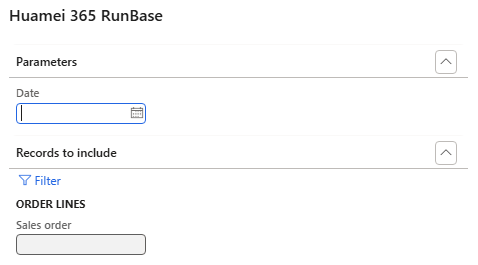
Result Validation
After opening the Job, if the Records to include query area appears in the Dialog, the control has been successfully added and is functioning correctly.
Using QueryRun in run()
1 | public void run() |
Notes:
gQueryRunshould be used directly inrun()- Do not reconstruct the Query, otherwise the user-defined conditions will be ignored
Summary
RunBasedoes not automatically manage Query objects- Records to include relies on
queryRun()+showQueryValues() QueryRunmust support pack / unpack- In Batch / RunInNewSession scenarios, always verify that query conditions are applied correctly