RunBaseBatch How to enable "Run In Batch"
How to Enable Run In Batch in RunBaseBatch
From a minimal implementation perspective,
RunBaseBatchandRunBaseJobs are implemented in a highly similar way.
This article explains how to correctly enable Run In Batch inRunBaseBatchusing the standard implementation approach.Note: The examples in this article are based on
RunBaseBatch, and the minimal implementation version is not repeated here.
Business Background
In D365 Finance & Operations, when a business process has the following characteristics, it is typically designed as a Batch Job:
- Long execution time
- Complex logic involving large volumes of data processing
- Not suitable for blocking the user interaction interface
RunBaseBatch is a standard framework provided by D365 that allows a RunBase Job to be seamlessly upgraded into a batch-capable Job, with built-in support for:
- Run In Batch
- Batch group
- Execution in a new session
However, this is only true if the implementation follows the framework’s expectations.
This article focuses on which methods must call super() and why this is critical for enabling Run In Batch.
Key Implementation
Step 1: Inherit from RunBaseBatch
1 | public class HM365RunBaseBatch extends RunBaseBatch |
Notes:
- Only by inheriting from
RunBaseBatchwill the system recognize the Job as batch-capable - Inheriting from
RunBasealone is not sufficient to enable Run In Batch
Step 2: Ensure new() calls super()
1 | public void new() |
Key points:
super()is not optionalIf omitted:
- Run In Batch will not appear in the Dialog
- The Job will not be correctly registered as a Batch task
This is a very common but subtle mistake
Step 3: Ensure dialog() calls super()
1 | public Object dialog() |
Notes:
super()is responsible for constructing the Batch-related areas of the DialogIf not called:
- Even if the Job inherits from
RunBaseBatch - Batch options will not be displayed in the Dialog
- Even if the Job inherits from
Step 4: Ensure getFromDialog() calls super()
1 | public boolean getFromDialog() |
Notes:
super()reads Batch-related parametersIf omitted:
- Run In Batch settings may not be correctly parsed
- Batch Job behavior may not match expectations
Result Validation
After the above steps are implemented correctly, opening the Job Dialog should display the Run In Batch options:
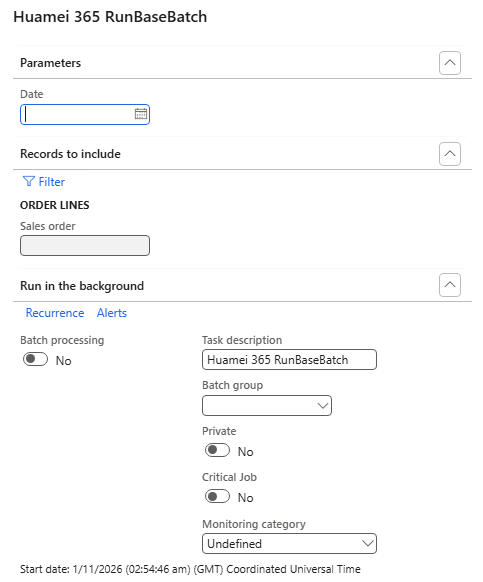
This confirms that:
- The
RunBaseBatchinitialization flow is complete - BatchInfo has been successfully constructed
- The Job can be submitted and executed as a Batch Job
Summary
- Enabling Run In Batch requires inheriting from
RunBaseBatch, notRunBase; - Calling
super()innew(),dialog(), andgetFromDialog()is mandatory, not a matter of coding style; - The
super()call chain contains critical logic for BatchInfo initialization and Batch parameter construction; - Even if the code compiles and runs, missing any required
super()call may result in Run In Batch being “visible but ineffective”; - In real projects, around 80% of RunBaseBatch issues are caused by incomplete initialization rather than business logic errors.